


PrestaShop Database Errors: How to Fix Duplicate Entry and Restore Your Online Store
An online store can suddenly stop accepting orders, leaving customers staring at a blank white page. This case study explains technical server errors in plain business language: why they cost sales and how to restore a PrestaShop store.
1. Why Do PrestaShop Database Errors Cost You Orders?
HTTP 500 Errors at Checkout and the White Screen
Store owners often hear about the issue from frustrated customers. A shopper adds an item to the cart, enters payment details and clicks Pay, only to see a blank page (HTTP 500). The system cannot save the order.
How MySQL Failures Prevent Customers from Checking Out
A PrestaShop store relies on many connected components. Each customer action triggers database queries (MySQL). When the database is overloaded or table structures are damaged, the site slows down or freezes. Shoppers do not want to wait and may abandon their purchase.
How Technical Errors Affect Site Speed and SEO
Googlebot regularly crawls your site. If category pages return database errors or the server responds slowly, Google may crawl them less often and your search visibility can suffer.
How Store Outages Waste Your Ad Budget
Imagine spending €100 per day on Google Ads. Buyers click your ads and visit the store, but a MySQL error prevents them from paying. You pay for the clicks without making sales. Technical failures undermine advertising ROI.
2. Diagnosis: What Causes SQL Errors in PrestaShop?
The owner of a large B2B/B2C PrestaShop store contacted us after the site repeatedly froze during peak traffic and checkout failed. Rather than guessing, our engineers started by analysing server and database logs.
Analysing Server, PHP and MySQL Logs
We started with the error logs. The Slow Query Log showed that even simple commands took up to ten seconds because of problems with the database indexes.

What Does Duplicate Entry for Key PRIMARY Mean?
The main issue was the common error Duplicate entry for key 'PRIMARY'. In plain language, imagine a database trying to give two different orders the same receipt number, such as 1005. The database refuses the duplicate value, stops the operation and the customer sees an error.
What Causes AUTO_INCREMENT Conflicts?
These numbers are assigned by AUTO_INCREMENT (the database’s internal counter). As described in the official MySQL documentation, improperly deleted orders or failed imports from an ERP system can cause the counter to become inconsistent with the existing records. The system then tries to assign an ID that is already in use.
How Do You Find Damaged Indexes and Table Structure Issues?
A database index is like the contents page of a large book. Poorly functioning third-party modules can break that index. The server may then have to scan huge numbers of rows to find a single product, putting unnecessary load on the system.
3. How We Fixed the PrestaShop Database Errors
Any work on a live store must be handled carefully to protect orders and customer data. We followed a clear technical process.
Step 1. Backups and a Staging Environment
Running SQL commands directly on a live server is risky. We backed up the full database and files, then created a separate staging copy on a private subdomain for safe testing.
Step 2. Examine the Database Structure and Conflicts
Using phpMyAdmin and the MySQL console, we identified inconsistencies in the tables ps_cart, ps_orders and ps_customer, where the records were no longer consistent.
Step 3. Fix Primary Keys and AUTO_INCREMENT
We used ALTER TABLE to reset and correctly recalculate the AUTO_INCREMENTcounter. The database was told which free number to use next, avoiding IDs already assigned to existing records.
Step 4. Optimise SQL Queries and Tables
We removed accumulated unnecessary data, including abandoned empty carts and old module logs, and ran OPTIMIZE TABLE to defragment the tables and improve data read performance.
4. Results: Restoring Store Stability and Performance
After the technical fixes, the site remained stable during advertising campaigns and checkout became substantially faster.
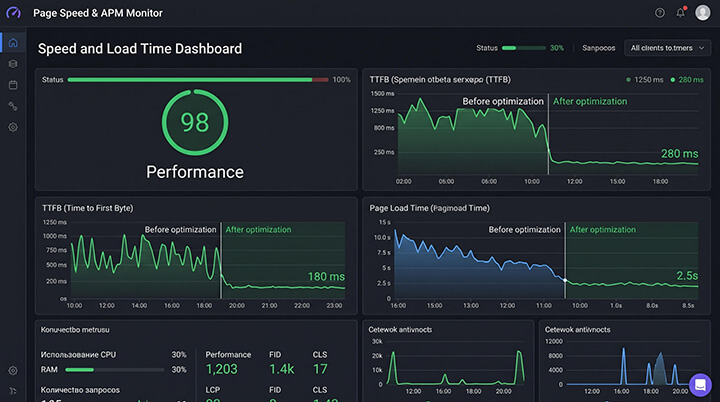
Performance Comparison: Before and After
| Metric | Before Optimisation (With Errors) | After Amirel’s Fixes |
|---|---|---|
| TTFB (server response time) | 1,250 ms (delays) | 280 ms |
| Checkout time | 15–20 sec (often froze) | 2.5 sec |
| HTTP 500 errors (per day) | ~ 45 | 0 |
| SQL errors in logs (per day) | Hundreds (Duplicate entry) | 0 |
| Successful checkouts | ~ 40% | 98% |
Removing SQL and HTTP 500 Errors
After fixing the AUTO_INCREMENTcounters, the database worked consistently and the server logs no longer showed failed writes.
Restoring Reliable Checkout
Customers were no longer blocked when entering payment details. Cart and order confirmation pages loaded quickly, helping daily revenue recover.
5. How Do PrestaShop Errors Affect SEO and Ad Performance?
How Server Errors Affect Googlebot Crawling
As stated in the Google Search Central documentation, repeated HTTP 500 responses can cause Googlebot to temporarily reduce crawling. As a result, new products, categories and prices may take longer to appear in Google Search.
How Load Speed Affects Customer Experience and Conversion
High TTFB caused by poorly optimised MySQL frustrates shoppers. The source article cites an estimate that each extra second of delay can reduce ecommerce conversion by 7–10%.
Why Technical Errors Hurt Google Ads Performance
When shoppers click an ad but immediately leave because the page is slow or broken, the click produces no sale. This can hurt campaign performance and increase customer acquisition costs.
6. How to Prevent PrestaShop Database Errors
Regular Database Backups and Monitoring
Automated daily backups help protect your business from data loss. Server monitoring can detect unusual load before the store goes down.
Check Modules and Update Compatibility
Never install untested plugins directly on a production store. Test how they affect the database in a staging environment first.
Redis and Other Caching Tools
We use Redis or Memcached where appropriate to speed up PrestaShop. Caching keeps frequently used data in memory, so the server does not need to repeat the same database queries for every customer click.
PrestaShop Technical Audit and Optimisation by Amirel
If your online store is slow, losing orders or showing errors, a content manager alone cannot solve the issue. You need database and server specialists.
- Diagnosing MySQL and PHP errors through server logs.
- Database optimisation, index rebuilding and removal of unnecessary data.
- Configuring server-side caching (Redis, Memcached).
- Technical support and 24/7 store availability monitoring.